Showing posts with label work. Show all posts

Wednesday, October 21, 2015

Monitoring Java based Applications: Metrics+Graphite+Grafana

As developers when we write a piece of code we try our best to make sure we have carefully chosen the best algorithms, the data structures are carefully tuned to match the situation at hand and the piece of software we wrote just works out of the box. Unfortunately life is not ideal and there are some hiccups that are bound to hit us however smooth the ride be. Some nasty bugs will inevitably show up on the production server as the software is used for a length of time. The best one can do then is to monitor the software being used in production environment, anticipate the problems before it hits the user and hampers their experience.

This post will talk about such a stack for monitoring java based applications involving:

We will use dropwizard metrics to instrument our Java code and push the data to graphite. Graphite will store our time-series data meaning values such as latency, performance, throughput, counts etc corresponding to say our APIs. Though Graphite renders graphs built on top of the time-series data as and when required, Graphite on its own doesn't provide the best visual experience and dashboard properties. We will thence use Grafana to build and view our dashboards. So the pipeline on a high level will be this:


Here is the documentation of dropwizard metrics listing its various capabilities. Their documentation is not that great, in my opinion, but workable. The good news is there is also a spring library that provides annotations you can use directly to enable instrumentation. Just add an annotation on top of a method and thats it. Here is an example:

@Metered(absolute = true, name= "RuntimeError")
public ErrorMessage handleThrowable(HttpServletRequest request, Throwable t) {

            ………..

            }

As you see here, there is an annotation (@Metred) which is responsible for instrumenting the following method- handleThrowable(...). The metred annotation gives the timed average meaning number of errors in a unit of time. As simple as that! The code in bold is all you need to write to instrument the following method, for instance.

Next, we need to tell our metrics where Graphite resides so data can be sent to Graphite. Here is how you configure this. The prefixedWith() attribute defines how Graphite will show this. Here is a screenshot from my Graphite dashboard showing the tree-based structure that we just set.


graphite-left.png

On the right of this pane shown above you ca see the graph you select. The visual features in Graphite is rather limited so we will forward the Graphit input to Grafana. Here is a video introducing Grafana interface.e


Make your dashboards the way you wish to see your graphs and keep monitoring to stay ahead of the bugs!

Tuesday, October 20, 2015

Log Archiving with Logstash

A crash, a panic attack and we rush to the logs hoping it comes to rescue. Alas there is so much content in these logs that finding the relevant content itself is a herculean task. It is thus a good idea to think upfront and brace yourself to handle the panic situation better. Keep all the logs ( application logs, database logs etc) nicely organized in a tree structure all of them being kept at one place. More technically, it is a good idea to archive your logs and have a way to make sense of the information hidden in logs. I was recently faced with such a situation and ended up making an ELK based stack.


I started with syslog-ng. Syslog has been around for sometime so it gave me a sense of stability and good community around it. Unfortunately syslog is a bit outdated too! The next thing we considered was logstash. Logstash along with Elasticsearch  and Kibana forms a powerful stack, popularly known as the ELK stack.


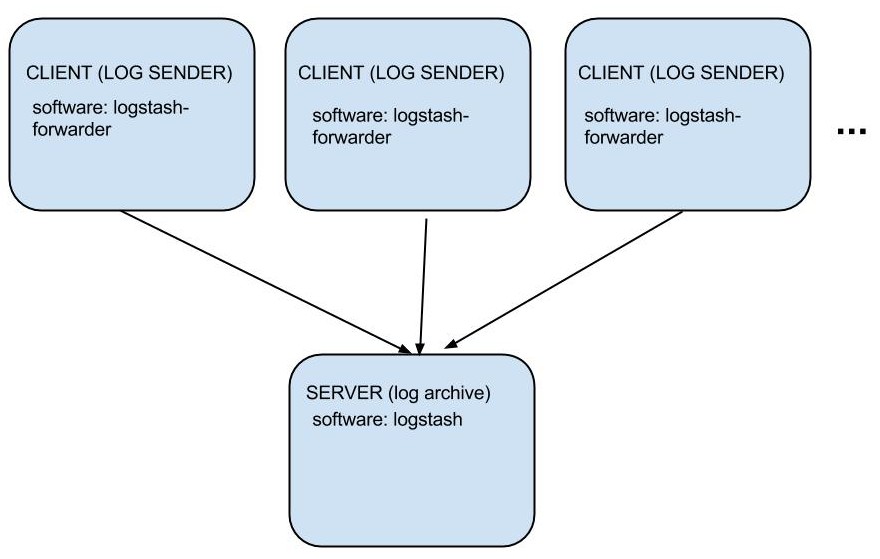
For this blog post, we will limit our scope and stick to logstash part of the ELK stack. We will make an archive which collects logs from different web and database servers and archives them all in one place. The intelligence and visual analysis are left to Elasticsearch and Kibana respectively and thence not part of this post. Following is a very high level architecture I came up with:


archiving architecture.jpg
We are going to work with two pieces of software here:
  1. logstash-forwarder
  2. logstash
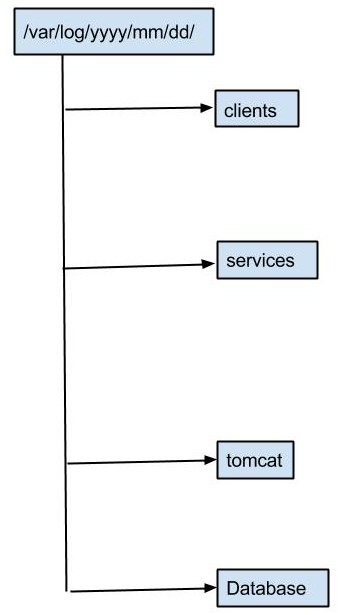
We will install logstash-forwarder on the clients (our applications that generate logs). This is an agent that sends the logs to a central archive server. Note that logstash-forwarder needs to be installed at EVERY client. We will next install logstash on the archiving server. This will receive logs from every client and archive it in a format that you can define. Here is what I came up with for my archive structure.
archive-structure.jpg


I like to archive by time and then the log source as depicted in the picture above. Now that we are done with sorting the architecture and our logging format we need to next configure our clients and the server. Digitalocean has done a wonderful job of explaining the installations and configurations so I will leave you with this article. You can skip the parts involving Elasticsearch, Kibana and ngnix.

Once you are done with archiving make sure you have a way to periodically clean logs from the application servers, if at all you store last 1-2 days of logs there too. For this I set up a cron job that cleans up logs older than a week in my case.

Wednesday, July 15, 2015

Amazon RDS use case: Disaster recovery and scalability

In the previous post in this series, we talked of the of native database usage versus Amazon RDS. We established some reasons as to why you could choose to go for Amazon RDS. In this post we will see what Amazon provides in terms of disaster recovery(DR) and scalability. Amazon RDS makes it so easy to set up both of these that you just click on a couple of things here and there and you are done. Lets look at each of these individually.

Disaster recovery is when you lose your data in the event of a disaster and want to have an option to fall back on. To achieve this you keep a copy of the data you have, being updated in real time along with the original copy. I recently stumbled across a senior project management in a conference who told me:
Chances of losing data in cloud is almost zero. We don't need disaster recovery at all. We have to do it only because our customers want to hear we have DR in place.
Living in the information age and a background in database replication that was hard for me to digest. Lets bank on the WhatsApp acquisition of Facebook. There are multiple interpretations of why Facebook paid the whooping amount and to me the most compelling one is the user base (aka the logical asset) of WhatsApp as a platform. That is how critical data can be. In the age of personalization, data in my opinion is soon going to be the single most precious thing to own. Needless to say being paranoid about your data is the way to go. Make sure your data is safe at any cost and that is where disaster recovery kicks in.

Getting back to the start up use case, disaster recovery is something that needs careful implementation. Automatic failover is ideal but there aren't many database providers offering automatic failover with zero downtime, and neither does Amazon offer zero downtime. Assuming you are a startup and your aim at the moment is disaster recovery, not necessarily with zero downtime, you can again fallback on Amazon's multi-AZ configuration.


Multi-AZ configuration is an architecture where you have a redundant copy of your data being replicated synchronously. When I say synchronously, do realize that in theory this should impact performance. For all practical purposes, the impact is negligible and I would expect this to be something you can simply ignore. Setting up multi-AZ configuration is super quick with Amazon RDS. A couple of clicks on their UI and you are done. A word of caution again from the start-up perspective is that multi-AZ is twice as costly as a single server deployment. Thats the only flip side of having a multi-AZ deployment as I see it.

Lets now turn to the second subtopic- scalability. The most obvious solution to scalability is adding a server (in the technical lingo, slave) that replicates asynchronously from your main server (master). In my experience, I generally see people worrying too much about asynchronous nature of replication fearing data inconsistency. Think hard about your use cases- asynchronous could just be enough. And if it is, Amazon RDS has again something called read-replicas to cater to this. So you will have an architecture like this:


The source here is the multi-AZ deployment that we discussed earlier and the sinks are the slave servers. Once you have this set-up you can scale on the go. Whenever you see the bottleneck on database end, buy one more Amazon RDS instance and attach it as a read replica. More the scalability needed, more the number of slaves- simple enough! Of course this is not the ultimate solution forever because managing tons of slaves isn't the easiest job out there. But as a startup if you have hit this problem you are really successful and should now be able to afford some DBAs to advice you anyway. We will look at the problems on this end and solutions to them in a separate post. For now its time to look back and pat yourself on the back for being quite successful as a start-up- successful enough to have so much data. Keep your data safe and have fun with it!

Thursday, June 4, 2015

The Amazon RDS use case: start up point of view

Coming from three years of experience working as a developer on MySQL, I always felt Amazon RDS (Relational Database System) was just snapping away customers from the database companies themselves by only making some wrappers around it to offer RDS. I hated the idea of using Amazon RDS instead of a database. In the last one month I have read a lot about Amazon RDS and my views have changed. I have started to understand that the amazon RDS does have a real good utility at times and does a god job too. Below I talk of the clear market I see for amazon RDS. Note that all content below is written from the point of view of a start up or a small company which is where I see Amazon RDS fitting the best.

I am a firm believer in the popular quote- Life is a sum total of the choices you make. When it comes to technology today, there are so many choices that the toughest part is choosing your software correctly to suit your use cases. One such problem I recently came across was maintaining a native database (backed by MySQL, postgreSQL or Oracle) or choosing to go with the Amazon RDS. As with all difficult choices it actually depends on the state of organization the most dominating factors being:

  1. The amount of money you are willing to spend. If you are broke on this front affording Amazon RDS is out of context.
  2. Flexibility- While the Amazon RDS does a great job of making things simple, in my opinion, it happens at the cost of losing flexibility that comes with using a native database. A counter question to ask yourself is- do you really need so much flexibility at this instant?
  3. In-house expertise: If you have guys carrying a real good experience on of the native databases, it is a good indicator to take on the challenge and go with a native database set up. Be assured though that shit happens and I would imagine more so with the native database in a five people company.
  4. Available time- small companies live and die by how much work they can get done on the application side. If you are a small company racing against time to add features to your product, this should seal the deal and you should should decide to use Amazon RDS even though it costs a little bit higher.
  5. Lastly, it all depends on your product or application and the nature of data it carries.

In a nutshell, the choice narrows down to the time you are willing to afford to work on the database end . Lets first see what tilts the argument in favor of Amazon RDS. The big thing that Amazon RDS enables is to save on labor for all sorts of things, for instance:
  1. Monitoring,
  2. Logging,
  3. Auto-scaling,
  4. Caching infrastructure,
  5. DB servers,
  6. Media transcoding etc.

So Amazon RDS frees you from thinking about all of that by paying some extra money and biting on your flexibility as explained in the introduction section. For the extra cash you burn you save on the labor involved in doing all of them.

If you choose to set up your own database and manage it, be it on your dedicated hardware on an Amazon EC2 instance, you need to realize that you will have to periodically invest in it

  1. To thoroughly document the set-up,
  2. Very thoroughly test the replication, failover behaviours, backup/restore flows etc.
  3. You will need to build a team to do most or all of this.
  4. Upgrade (whenever required) yourself
  5. You will have to go through the practice runs (backup, restore, failover) all over again to make sure everything still works.
  6. Remain failsafe so if postgres fails in a weird way, you need to carefully punt parts of the infrastructure in a pre-determined way to avoid data loss etc.

As a rule of thumb if running your own native database would markedly improve the product, do it. If not, you are probably looking at trading upfront cost for labor expense. For a small company with low manpower, I think one should really let Amazon RDS handle everything and focus on the product for the time being


Sadly, this is an excerpt from the notes I had while studying this subject. At that time there was no idea of writing a blog and hence I have lost the references but all this is mostly derived from quora, stackoverflow and the official manual for Amazon RDS. Lastly, best of luck on managing your data. Keep your data safe and have fun!

Monday, April 13, 2015

MySQL 5.7.6: It is easier to switch master now!

Introduction
One of the primary objectives of MySQL replication is providing an easy failover process i.e. switching to a redundant system if the primary MySQL server fails. In MySQL this translates to switching to the most appropriate slave server in the eventuality of a failure of the master server.
The promotion of a candidate slave to become a new master is based on a lot of factors, undoubtedly the most important factor being that the chosen slave should be most up to date with the primary server (the old master) before we lost it! This blog explains how to use new features in MySQL 5.7.4 and later to make failover easier.
To find the most up to date slave server, a failover script looks at the set of transactions received by the slave and compares it with every other slave to find the one that has received the biggest set of transactions. There could be more sophisticated ways of doing this, for instance you could choose one preferred slave that you want to promote (perhaps it has a better hardware configuration, it has no filters, physical location etc) and make sure it receives every transaction that has been received by all the other slaves. For simplicity though, let’s narrow down our definition of the most appropriate slave to promote to be the one that is most up to date with the lost master.
How to failover using GTID based replication
To denote a set of transactions, MySQL uses GTID sets (a set of global transaction identifiers). To read more about GTIDs, you can refer to our official documentation or developer blogs. To find the set of transactions received by a MySQL slave server, you simply execute:
mysql> SELECT RECEIVED_TRANSACTION_SET FROM peformance_schema.replication_connection_status;
+------------------------------------------+
| RECEIVED_TRANSACTION_SET                 |
+------------------------------------------+
| 4D8B564F-03F4-4975-856A-0E65C3105328:1-4 |
+------------------------------------------+
Execute this on every slave and compare the sets to find the slave with largest received transaction set- that’s your candidate slave for promotion. Let us call this slave the new master. Before you switch a slave to replicate from the new master, you earlier had to make sure all the transactions the slave has received are executed. In versions of MySQL prior to 5.7.4, you needed to do the following steps:
  1. stop slave.
  2. start slave to replicate until all received transactions are executed.
  3. wait until all received transactions are executed.
  4. switch master to redirect slaves to replicate from new master.
  5. start slave
This would translate to the following MySQL commands:
  1. STOP SLAVE;
  2. START SLAVE UNTIL SQL_AFTER_GTIDS= <received_transaction_set>;
  3. SELECT WAIT_FOR_EXECUTED_GTID_SET(<received_transaction_set>);
  4. CHANGE MASTER TO <new_master_def>;
  5. START SLAVE;
However, in MySQL-5.7.4, we introduced a feature which allows one to selectively stop only that component of replication which requires a change. This means that in the present context, to switch to a new master we only need to stop the receiver module (or in technical terms the I/O thread). The applier threads can continue applying transactions, if there are any pending, while we switch master. Building on this infrastructure we can now reduce the above steps to the following:
  1. Stop the receiver module (STOP SLAVE IO_THREAD).
  2. Switch master (CHANGE MASTER TO <new_master_def>).
  3. Start the receiver module (START SLAVE IO_THREAD).
Note the removal of the wait function (wait_for_gtid_executed_set) to ensure that the received transactions are executed before you switch master. There is no need for that step anymore!
How to failover using non-GTID based replication
If you are not using GTIDs, though we highly recommend you should, you can still take advantage of the current improvements. This means you can change the following part of your failover script:
  1. STOP SLAVE
  2. SHOW SLAVE STATUS to get coordinates (Read_Master_Log_Pos, Master_Log_File)
  3. START SLAVE UNTIL coordinates saved in step (2).
  4. SELECT MASTER_POS_WAIT (coordinates,...).
  5. CHANGE MASTER TO <new_master_def>.
  6. START SLAVE.
to the following simpler steps:
  1. STOP SLAVE IO_THREAD;
  2. CHANGE MASTER TO <new_master_def>;
  3. START SLAVE IO_THREAD.
Conclusion
Using the improvements in the newer versions of MySQL 5.7, failover becomes easier. Our effort to improve MySQL high availability continues and we remain committed to easing the processes. Please do try this, and as always let us know your feedback. You can also use mysqlfailover or MySQL Fabric that automate the failover process.

Sunday, March 22, 2015

MySQL-5.7.6: Introducing Multi-source replication

On March 10, 2015, we released MySQL-5.7.6 and among many other things it includes multi-source replication which provides the ability for a MySQL slave server to replicate from more than one MySQL master. We have been very careful with multi-source replication in terms of what exactly our users want and we have tried our best to incorporate as much feedback as possible. In the process, we released the feature twice under MySQL Labs asking users to try it out and tell us:
  1. If this caters to all their use cases,
  2. Plays well with the existing applications using single source replication so our users don’t have to change their old scripts at all if they do not intend to use multi-source and instead stick to single source replication.
  3. The user interface is in sync with our naming conventions to date, easy to understand and intuitive etc.
Note that the look and feel changed as we moved from one lab release to another and finally to the latest version as MySQL-5.7.6. In this post, I aim to introduce the released feature, the commands and how you can monitor the multi-source replication internals. Let's start with the following figure that best illustrates the core of multi-source replication.

In the figure above we have three MySQL sources (independent MySQL servers- master 1, master 2 and master 3) replicating to the only slave acting as a sink to collect all the data from all the three sources.
The use cases of multi-source, as you have probably already guessed, are related to data aggregation. Note that there is no conflict detection or resolution built into multi-source replication. We expect the application to make sure that data coming from different sources are non-conflicting. A typical setup could be something like this:

The same concept could be extended to shards (instead of databases). So another use case of multi-source replication is to join shards and make a full table on the sink (aka slave). .
To understand how to configure and monitor multi-source replication, we introduced the notion of channels. A channel is an abstraction of the internals of MySQL replication's finer details. It hides the machinery underneath while providing the level of detail that helps the user manage and understand multi-source replication. From a user perspective you can imagine a channel as a pipe between a master and a slave. If there are multiple masters, there are the same number of channels (or pipes) emerging out of the slave server as the number of sources as shown in the picture below:

If you understand MySQL internals already and want to know exactly what constitutes a channel, look at the pink strip in the following picture. The replication channel documentation has all the details. But if you don’t know these details already, ignore this figure and move ahead. After all that is what we wanted to achieve with the concept of a channel.

With the concept of channels established, you can now follow steps described in the tutorial section of our official documentation to work with multi-source replication. Note how the FOR CHANNEL <channel_name> clause now allows you to take each master-slave instance individually and work with them as if you were working with a single source replication topology.
Having set up multi-source replication and making sure there are no conflicts you can expect it to just work out of the box. But if you want more details you could look at our monitoring interfaces to provide you the details on every channel. In MySQL-5.7.2, we introduced performance_schema tables to monitor replication, the good news is that these tables were always designed with multi-source replication in mind so they should work seamlessly with multi-source replication. All six replication performance schema tables now have a “channel_name” field added to them to individually access the configuration and status on each channel. As an example, we have described performance_schema.replication_connection status in our manual. Given that you are working with multiple channels, lets walk through this table again and see how it presents the internals. Try out the following query to look at the receiver module:

We can see quite a few things here:
  1. Which master does channel1 replicate from?
    The one whose UUID is as given in the “source_uuid” column.
  2. Which thread is responsible for receiving transaction through channel1?
    Thread number 13. Note that this thread number is same as the one in performance_schema.threads table. You can use this information to now look into other performance_schema tables to mine more statistics using the joins.
  3. Is the receiver module of channel1 active or down at the moment?
    The channel is active and receiving transactions because its service state is ON.
  4. What transactions have been received via channel1?
    Transactions 1-4. See the global transaction identifiers in the field "received_transaction_set".
  5. What if there was an error?
    The last three fields in each row give an idea of the error on that channel, if any.
    See  the example below where channel1 has lost connection:


  6. How about my network?
    Look at the last two columns to get an idea of this. The last time a heartbeat signal was sent is shown in the “last_heartbeat_timestamp” column.
    The "count_received_heartbeat" indicates how frequently heartbeats are being sent out. A big number here would mean that either the connection is not stable or this channel was idle having nothing to replicate.
Likewise there are more replication performance_schema tables that you can use to get to finer details. If there is anything else that you think should be available in these tables per channel, leave us a comment and we would be happy to take it forward. We truly believe in working with our users and look forward to your experience with this feature. There is a lot more to explore in multi-source replication so go try out the feature and if there is anything that you have suggestions for, please do leave a comment. Don't forget that MySQL 5.7.6 is a development milestone release (DMR)and therefore not yet declared generally available.

Thursday, October 16, 2014

MySQL 5.7.5- More variables in replication performance_schema tables

At MySQL, replication usability is of utmost importance to us. Replication information has long been part of SHOW commands, SHOW SLAVE STATUS occupying a major chunk of it. The other sources of replication information being:
As the replication module grows further, there is a lot more monitoring information, so much that the present interfaces seem too rigid to accommodate all the information we would like to present. So we need to organize them in a more structured manner. In MySQL-5.7.2, we introduced replication performance_schema (P_S) tables providing an SQL interface to monitor replication configuration and status partitioned into different tables, each table grouping logically related information. You can read more about the contents of these tables from official MySQL documentation.
In MySQL-5.7.5 we added some more status variables to these performance_schema tables to enable monitoring the latest replication features viz. multi-source replication in labs. Multi-source allows a MySQL slave to replicate from multiple sources (masters) directly. Talking of multi-source, one needs the replication information per source. So we added global variables that would be useful to extend to per-source scope to the replication performance\_schema tables to help monitor multi-source replication. Note that these variables still work for the single sourced replication and can still be accessed as:
Show status like 'Slave_running';
Show status like 'Slave_retried_transactions';
Show status like 'Slave_last_heartbeat';
Show status like 'Slave_received_heartbeats';
show status like 'Slave_heartbeat_period';
Note though that the status variables are now mostly useful in single-source mode ONLY. If more sources are added, the status variables still just apply to the first source. For other replication sources (masters), the only way to access these variables is to use the replication performance_schema tables as named in the table below. Here is how the names of server variables map to the names in the replication performance_schema tables:
VARIABLE NAMEP_S TABLE NAMEP_S FIELD NAME
 SLAVE_HEARTBEAT_PERIOD replication_connection_configuration HEARTBEAT_INTERVAL
 SLAVE_RECEIVED_HEARTBEATS replication_connection_status COUNT_RECEIVED_HEARTBEATS
 SLAVE_LAST_HEARTBEAT replication_connection_status LAST_HEARTBEAT_TIMESTAMP
 SLAVE_RETRIED_TRANSACTIONS replication_execute_status COUNT_TRANSACTIONS_RETRIES
The variable 'slave_running' reports whether the slave is running or not. This can be found by inspecting the two replication components (receiver and applier) separately to see if the receiver module is running or not by executing
SELECT SERVICE_STATE FROM performance_schema.replication_connection_status;
And execute module is running or not by executing
SERVICE_STATE FROM performance_schema.replication_execute_status;
Please try out multi-source replication and our new monitoring interface in the form of replication performance_schema tables. As always, your feedback is very valuable to us.

Tuesday, April 1, 2014

MySQL-5.7.4- Change master without stopping slave altogether

At MySQL, we have been working on simplifying the failover process making it faster, more flexible and easier to use. MySQL-5.6 came up with Global Transaction Identifiers (GTID) which was a huge leap in the direction of easing the failover process hiding the details about replication logs and positions. With MySQL-5.7.4, we are introducing a new feature that further adds to flexibility and onliness- the user can only shut down components that he needs to re-configure.

What we allow with this new feature is to execute CHANGE MASTER TO command without stopping slave altogether. We realized that stopping slave altogether is not mandatory in all cases and doing that was more of a cautious approach to switching master restricting more than what’s required at times.

Lets dive deep into this to see what can be relaxed here. For this, lets break the replication process into two modules:
M1) Receiver module (concerned with IO thread) and
M2) Applier module (concerning SQL thread or coordinator and worker threads, whichever be the case)

We can now divide options under the command CHANGE MASTER TO into three groups based on the above classification: 

G1) Options that change a receiver configuration. 
G2) Options that change an applier configuration. 
G3) Options that relate to both (1) and (2). 

For the precise division look at the picture below. Note that the illustration takes into account all the CHANGER MASTER TO options present currently (MySQL-5.7.4). 


Note that given its current usage, we could put the MASTER_AUTO_POSITION  option under group G1(i.e., receive side). Currently only the receiver module uses GTID positioning but we foresee that in future it will be good to allow the applier module to use GTID positioning. We thus keep the master_auto_position option under group G3 to keep things future-proof. Worried that obstructs the failover process again like before? Well that's not a problem as MASTER_AUTO_POSITION is a slave's configuration that you only set once. Then it affects all future times that you redirect to a new immediate master. So you don't specify it on fail-over.

With the classifications stated above, we propose a 3-point rule stated as:
R1) For CHANGE MASTER TO options under group G1, stop only receiver module (M1) using the command STOP SLAVE IO_THREAD command.
R2) For CHANGE MASTER TO options under group G2, stop only applier module (M2) using the command STOP SLAVE SQL_THREAD command.
R3) For CHANGE MASTER TO options under group G3, stop both receiver (M1) and
applier modules (M2) using the command STOP SLAVE.

HOW DOES THIS RULE WORK?
Lets explore more about our 3-point rule(R1-R3):

  • Starting with rule R1, we stated that we only need to stop the receiver thread to change receive options. What happens to the applier module? Well the applier module keeps applying pending transactions, if any. If you have a situation where the slave was lagging behind with a lot of transactions queued into the slave's logs, you can allow the applier module to catch up while you switch masters or change a configuration on the receive side keeping the master same.
  • Under rule R2, we stated that we can change configuration of applier module after stopping the applier threads ONLY, receiver module can be running while you do this. So while you fine-tune your slave applier module the receiver module keeps reading master's log and copying transactions to the slave's log. These could then be applied in-parallel by the slave when the applier module is up and running.
  • Under rule R3, you stop both receiver and applier modules. So, this is analogous to
    STOP SLAVE;
    CHANGE MASTER TO <master_def>;
    used before this feature was available.

Worried how relay log purge would be handled now? Well its pretty simple- Under rules R1 and R2, we do not purge logs implicitly on executing the CHANGE MASTER command so that the receiver or applier whichever is running just keeps processing/adding relay logs as it would do if no replication thread was stopped.

Finally note that you need not always look at the figure above to find which options are allowed which thread being stopped. You just need to ask yourself if the parameter is related to receiver thread and stop the concerned thread. And if you go wrong there are error messages to guide you on the right path. Look at the next section for the usage and the errors.

EXAMPLES OF USAGE
example 1:
Previously, to change master heartbeat period, you would do a

STOP SLAVE;
CHANGE MASTER TO MASTER_HEARTBEAT_PERIOD= <value>;
START SLAVE;

Now, with this feature you just have to stop the receiver (io) thread as heartbeat has nothing to do with the applier thread(s).
 
STOP SLAVE IO_THREAD;
CHANGE MASTER TO MASTER_HEARTBEAT_PERIOD= <value>;
START SLAVE IO_THREAD;

Note that the applier thread keeps executing the transactions in the relay log while you change the heartbeat period for the master-slave connection. Likewise, you could do this with all the attributes mentioned in group G1 in the figure above.

example 2:
Similarly, to change applier thread attributes, you just have to stop the applier threads.
So instead of

STOP SLAVE;
CHANGE MASTER TO MASTER_DELAY=<value>;
START SLAVE;

it is enough to do the following with this feature.

STOP SLAVE SQL_THREAD;
CHANGE MASTER TO MASTER_DELAY=<value>;
START SLAVE SQL_THREAD;

Lastly, if you go wrong there are nicely worded error message to guide you. So in the first case, if your receiver module is active and you execute a

CHANGE MASTER TO MASTER_HEARTBEAT_PERIOD= <value>;

 you get an error saying:
This operation cannot be performed with a running slave io thread; run STOP SLAVE IO_THREAD first.


and if you forgot changing applier module when it was required, the server will say:

This operation cannot be performed with a running slave sql thread; run STOP SLAVE SQL_THREAD first.


Lastly you still have the error message saying both the threads should stop appearing only for MASTER_AUTO_POSITION option now:
MASTER
This operation cannot be performed with a running slave; run STOP SLAVE first.

Lets see some examples once again:

example 3:
slave>START SLAVE;
slave>CHANGE MASTER TO MASTER_DELAY= 10;
ERROR 1900 (HY000): This operation cannot be performed with a running slave sql thread; run STOP SLAVE SQL_THREAD first

example 4:
mysql> CHANGE MASTER TO MASTER_HEARTBEAT_PERIOD= 10;
ERROR 1904 (HY000): This operation cannot be performed with a running slave io thread; run STOP SLAVE IO_THREAD first.

example 5:
mysql> CHANGE MASTER TO MASTER_AUTO_POSITION= 0;
ERROR 1198 (HY000): This operation cannot be performed with a running slave; run STOP SLAVE first

SIDE-EFFECTS?

While implementing this, we have taken special care to make sure we dont break anything for a user switching masters like:

STOP SLAVE;
CHANGE MASTER to <master_def>;
START SLAVE.

There are absolutely NO side-effects to worry you. Note that as stated before, CHANGE MASTER TO will not delete relay logs if one of the receiver or applier thread is running.

Try it out and give us your feedback. As always, we look forward to hearing from you to improve this feature. Enjoy :)

Sunday, September 22, 2013

MySQL 5.7: Monitoring Replication with the Performance Schema tables

In the previous post, we had a look at the Performance Schema tables to monitor MySQL replication. We discussed why these were needed, what advantages they have to offer and what each table stands for. We also did a small exercise to see how one can select a particular table given the data that is needed. We will now dive deeper and look at the individual tables to understand what fields they are made of. We will also go through different scenarios to see how the different pieces of data can be used.

Note that these tables report the status/configuration of a replication slave. So, these are empty at the master server or at a standalone server. All the SELECTs we will talk of, are done at the slave. Lets take the tables one by one and go through them.

REPLICATION_CONNECTION_CONFIGURATION:

This table shows the configuration parameters used by the slave server for connecting to the master server. Lets set up replication with the following CHANGE MASTER TO command executed on a slave server. The  CHANGE MASTER TO command adds/changes the parameters that the slave server uses for connecting to the master server. To see the definition of all the fields in this table, please visit our official documentation.

mysql> change master to master_host='127.0.0.1', master_port=13000 ,
master_user='rpluser', master_password='secret', master_connect_retry=40, 
master_retry_count=10, master_ssl=1, master_ssl_verify_server_cert=1, 
master_auto_position=1; 
Query OK, 0 rows affected, 2 warnings (0.51 sec)

We can now look up the connection parameters set in our table for replication connection configuration. Lets do a SELECT * on this table to see what we get:

mysql> select * from performance_schema.replication_connection_configuration\G
*************************** 1. row ***************************
                         HOST: 127.0.0.1
                         PORT: 13000
                         USER: rpluser
            NETWORK_INTERFACE:
                AUTO_POSITION: 1
                  SSL_ALLOWED: YES
                  SSL_CA_FILE:
                  SSL_CA_PATH:
              SSL_CERTIFICATE:
                   SSL_CIPHER:
                      SSL_KEY:
SSL_VERIFY_SERVER_CERTIFICATE: YES
                 SSL_CRL_FILE:
                 SSL_CRL_PATH:
    CONNECTION_RETRY_INTERVAL: 40
       CONNECTION_RETRY_COUNT: 10
1 row in set (0.00 sec)

You can see that the changes made by CHANGE MASTER TO command can be seen in this table. These values are preserved here until the next CHANGE MASTER TO or RESET SLAVE ALL command. A row in this table represents a connection between the slave and its master. Since we have only one master here, we see only one row. If MySQL supported multi-source, then this table would have information about multiple sources- one row per source.

Note that a START SLAVE is not done yet. The CHANGE MASTER TO command makes changes to the internal data structures regarding the connection parameters (if you know the internals, the "active_mi" variable is what I am talking about) and this table just picks up values from this data structure. So, the values shown in the table just reflects the state of the this data structure at the moment the SELECT was done.

Lets now move to the next table "replication_connection_status".

REPLICATION_CONNECTION_STATUS:

This table shows the current status of connection between the slave and its master. Technically, it talks about the IO thread's status. To view the definition of all the fields in this table, please visit our official documentation. Now, we need a START SLAVE because this command establishes the connection between slave and its master. So, lets execute a START SLAVE/ START SLAVE IO_THREAD command followed by a SELECT* from "replication_connection_status" table.

mysql> start slave; Query OK, 0 rows affected (0.05 sec)

mysql> select * from performance_schema.replication_connection_status\G
*************************** 1. row ***************************
             SOURCE_UUID: 1766a057-10cd-11e3-b06a-0021cc72bfc3
               THREAD_ID: 2
           SERVICE_STATE: ON
RECEIVED_TRANSACTION_SET:
       LAST_ERROR_NUMBER: 0
      LAST_ERROR_MESSAGE:
    LAST_ERROR_TIMESTAMP: 0000-00-00 00:00:00

So, we can see from here that, at the moment SELECT was done:

  1. The slave was reading from a master with UUID= 1766a057-10cd-11e3-b06a-0021cc72bfc3,
  2. The thread that handles this connection (IO thread) has an id=2. The thread_id field is very useful if you want to join this table with other Performance Schema/Information Schema tables. As an example, you can join this table with the table performance_schema.threads to extract a lot more information about this connection (IO thread). Likewise, there is a lot more  thread-wise statistics you can collect with the other existing Performance Schema tables. Note that there is a bug here  but thankfully there is an easy workaround.
  3. Further, we see that our connection (the IO thread) is ready for service (SERVICE_STATE: ON). 
Note that the service state shows one of (ON/OFF/CONNECTING):
  • ON: meaning ready to serve i.e. if there is an event that is executed on master, you can assume      that it will be read by the slave via this connection.
  • OFF: meaning the connection (IO thread) is not serving i.e. it is not ready to read from the master or killed.
  • CONNECTING: meaning the connection (IO thread)is not established yet but the slave is trying to connect.
It is important to note here that the names and semantics of thread_id and service_state is extended to all the status tables and they all mean exactly the same. Hence, going forward lets skip explaining these two columns in the following tables.

Lets now execute a couple of queries on the master server and see if we can get the set of received transactions on our slave server.

mysql>create table test.t(a int primary key); Query OK, 0 rows affected (0.61 sec)
mysql>insert into test.t values(1); Query OK, 1 row affected (0.06 sec)

Lets turn back to our slave server and see what the field "received_transaction_set" has.

mysql> select received_transaction_set from performance_schema.replication_connection_status\G
*************************** 1. row ***************************
RECEIVED_TRANSACTION_SET: 1766a057-10cd-11e3-b06a-0021cc72bfc3:1-4
1 row in set (0.00 sec)

Lets now cause an error in the connection (IO thread) and look at the error related fields in this table. To cause an error in the connection, we will provide a wrong password in our CHANGE MASTER TO command.


mysql>stop slave; Query OK, 0 rows affected (0.10 sec)mysql>change master to master_password='abcd'; Query OK, 0 rows affected, 2 warnings (0.29 sec)
mysql> start slave;Query OK, 0 rows affected (0.05 sec)


mysql> select last_error_number, last_error_message, last_error_timestamp from 
performance_schema.replication_connection_status\G
*************************** 1. row ***************************                   
  LAST_ERROR_NUMBER: 1045                                                         
  LAST_ERROR_MESSAGE: error connecting to master 'rpluser@127.0.0.1:13000' - retry-time: 40 retries: 2                                                           
LAST_ERROR_TIMESTAMP: 0000-00-00  
1 row in set (0.00 sec)


The names and semantics of the error related fields(number, message and timestamp) are again exactly same across all the tables, wherever applicable. Hence, going ahead, lets skip monitoring error related fields in the following tables.

Lets now clean-up the error we caused to move ahead and work with other tables.

mysql> stop slave; Query OK, 0 rows affected (0.06 sec)mysql> change master to master_password='secret'; Query OK, 0 rows affected, 2 warnings (0.25 sec)mysql> start slave; Query OK, 0 rows affected (0.08 sec)

mysql> select last_error_number, last_error_message, last_error_timestamp from 
performance_schema.replication_connection_status\G
*************************** 1. row ***************************                   
  LAST_ERROR_NUMBER: 0                                                         
  LAST_ERROR_MESSAGE:                                                           
LAST_ERROR_TIMESTAMP: 0000-00-00  
1 row in set (0.00 sec) 

Great! We are done with monitoring the connection specific parameters between a slave and its master. Lets now move to the other half of replication module- execution of events received from the master on the slave server.

REPLICATION_EXECUTE_CONFIGURATION/STATUS:

This table shows the configuration parameters that affect execution of transactions by the slave server. Parameters stored in the table can be changed with the CHANGE MASTER TO command. Lets setup a delayed replication now and see how the same can be read from the tables replication execute configuration.


mysql> stop slave; Query OK, 0 rows affected (0.11 sec)mysql> change master to master_delay=150; Query OK, 0 rows affected (0.29 sec)mysql> start slave; Query OK, 0 rows affected (0.06 sec)

mysql> select desired_delay from performance_schema.replication_execute_configuration\G
*************************** 1. row ***************************
DESIRED_DELAY: 150
1 row in set (0.00 sec)

Lets now execute an event at our master to see if the event is executed at the slave or not.

mysql> insert into test.t values(1); Query OK, 1 row affected (0.06 sec)

Lets move to slave and make sure our slave has not elapsed the 150 second delay yet.

mysql> select remaining_delay from performance_schema.replication_execute_status\G
*************************** 1. row ***************************
REMAINING_DELAY: 147
1 row in set (0.00 sec)

Now we should be able to see that although the insert(2) is received at slave it is not executed yet. The last time we saw our received_transaction_set (before insert(2)), it was 1766a057-10cd-11e3-b06a-0021cc72bfc3:1-4. So insert(2) should be assigned a GTID 1766a057-10cd-11e3-b06a-0021cc72bfc3:5.

mysql> select received_transaction_set from performance_schema.replication_connection_status\G
*************************** 1. row ***************************
RECEIVED_TRANSACTION_SET: 1766a057-10cd-11e3-b06a-0021cc72bfc3:5
1 row in set (0.00 sec)

Ok, we have received the event. Now lets see if this insert(2) with GTID 1766a057-10cd-11e3-b06a-0021cc72bfc3:5 is executed yet.

mysql> select @@global.gtid_executed\G
*************************** 1. row ***************************
@@global.gtid_executed: 1766a057-10cd-11e3-b06a-0021cc72bfc3:1-4
1 row in set (0.00 sec)

Lets now wait until, our delay is elapsed.

mysql> select remaining_delay from performance_schema.replication_execute_status\G
*************************** 1. row ***************************
REMAINING_DELAY: 0
1 row in set (0.00 sec)

And check if the insert(2) has been executed.

mysql> select @@global.gtid_executed\G
*************************** 1. row ***************************
@@global.gtid_executed: 1766a057-10cd-11e3-b06a-0021cc72bfc3:1-5
1 row in set (0.00 sec)

Executed. Great!

Before going ahead to have a look at the other goodies in store, lets revise a couple of things:
  • SQL THREAD: Executes the events received from the master at slave.
  • MULTI-THREADED SLAVE (MTS): With only one thread (SQL thread) reading and applying events that are applied by multiple clients concurrently on the master, the slave starts lagging behind the master. In this case, one can chose to opt for MTS. Simply put, we have a buffer (relaylog) on slave server that stores the events executed on the master server. The coordinator thread reads the relaylog and assigns these to worker threads which execute the events assigned to them parallely on the slave. The coordinator thread is the scheduler and the worker threads are responsible for executing the events.

REPLICATION_EXECUTE_STATUS_BY_COORDINATOR:

This table is used in two ways depending on whether the slave is operating with one applier (MTS disabled) or multiple appliers executing events in parallel(MTS enabled). When operating with one applier, this table reports the status of this applier. When multiple appliers, the same table reports the status of the scheduler (coordinator thread). Lets explore the single applier use case.

mysql> select * from performance_schema.replication_execute_status_by_coordinator\G
*************************** 1. row ***************************
           THREAD_ID: 13
       SERVICE_STATE: ON
   LAST_ERROR_NUMBER: 0
  LAST_ERROR_MESSAGE:
LAST_ERROR_TIMESTAMP: 0000-00-00 00:00:00
1 row in set (0.00 sec)

We see that the applier's (SQL thread) id is 13 and it is alive (SERVICE_STATE: ON). For now there are only two states that we show- ON/OFF. The semantics of error fields are exactly similar to the explanations earlier. Hence we skip them here.

The Multiple applier case (MTS enabled) is similar except that this table will show the scheduler's (coordinator) thread id. Hence we will skip the explanations and move to the next table. To read more about this table, please visit our official documentation for this table.

REPLICATION_EXECUTE_STATUS_BY_WORKER (Single Applier Case):

When the slave server is operating in the single applier mode, lets see what the table replication_execute_status_by_worker shows us. Conceptually, we don't have a scheduler and multiple appliers. so the table should be empty.

mysql> select * from performance_schema.replication_execute_status_by_worker\G
Empty set (0.00 sec)

And it is empty :)

REPLICATION_EXECUTE_STATUS_BY_WORKER (Multiple Appliers Case):

Lets now set up our slave to use multiple appliers (MTS enabled) and then see how we can monitor the replication status concerned with our scheduler and appliers (coordinator and worker threads). Lets call our multiple appliers "worker".

mysql> stop slave; Query OK, 0 rows affected (0.10 sec)
mysql> SET GLOBAL slave_parallel_workers=2; Query OK, 0 rows affected (0.00 sec)

Note that a START SLAVE is necessary to have the workers ready for action. Just setting slave_parallel_workers=2, doesn’t spawn the 2 workers.

mysql> start slave; Query OK, 0 rows affected, 1 warning (0.14 sec)

mysql> select * from performance_schema.replication_execute_status_by_worker\G
*************************** 1. row ***************************
            WORKER_ID: 0
            THREAD_ID: 16
        SERVICE_STATE: ON
LAST_SEEN_TRANSACTION:
    LAST_ERROR_NUMBER: 0
   LAST_ERROR_MESSAGE:
 LAST_ERROR_TIMESTAMP: 0000-00-00 00:00:00
*************************** 2. row ***************************
            WORKER_ID: 1
            THREAD_ID: 17
        SERVICE_STATE: ON
LAST_SEEN_TRANSACTION:
    LAST_ERROR_NUMBER: 0
   LAST_ERROR_MESSAGE:
 LAST_ERROR_TIMESTAMP: 0000-00-00 00:00:00
2 rows in set (0.00 sec)

So, we see that we have two rows to represent the two workers. The worker_id field here is same as the id field in slave_worker_info table, so you can again join the two tables to know more about a worker thread. The service_state(ON/OFF) has nothing new to add.
The interesting parts here are:
  1. You get the per worker error. So, if two of your workers have errored out in a group, you can identify both the errors as opposed to only one through SHOW SLAVE STATUS.
  2. last_seen_transaction is the new field we have added to help detect MTS failures better. This helps you find the GTID of all the transactions being executed by the all the workers at the moment the error happened. These values are preserved in case of an error and in the idle state of the worker after executing the transactions.
To read more about this table and field-wise descriptions, please visit our official documentation for this table.

CONCLUDING REMARKS:

The goal of this post was to help you familiarize with the Performance Schema tables relating to replication. Please try out this new interface for monitoring MySQL replication and let us know your feedback. To read more on these Performance Schema tables, you can visit the blog on multisource replication by Rith. These Performance Schema tables look really powerful with multisource replication. The motive behind this feature was to make it easier to monitor the health and performance of MySQL replication. We hope this new interface to monitor MySQL replication makes our user's life easier.